CanvasXpress MCP & Agents
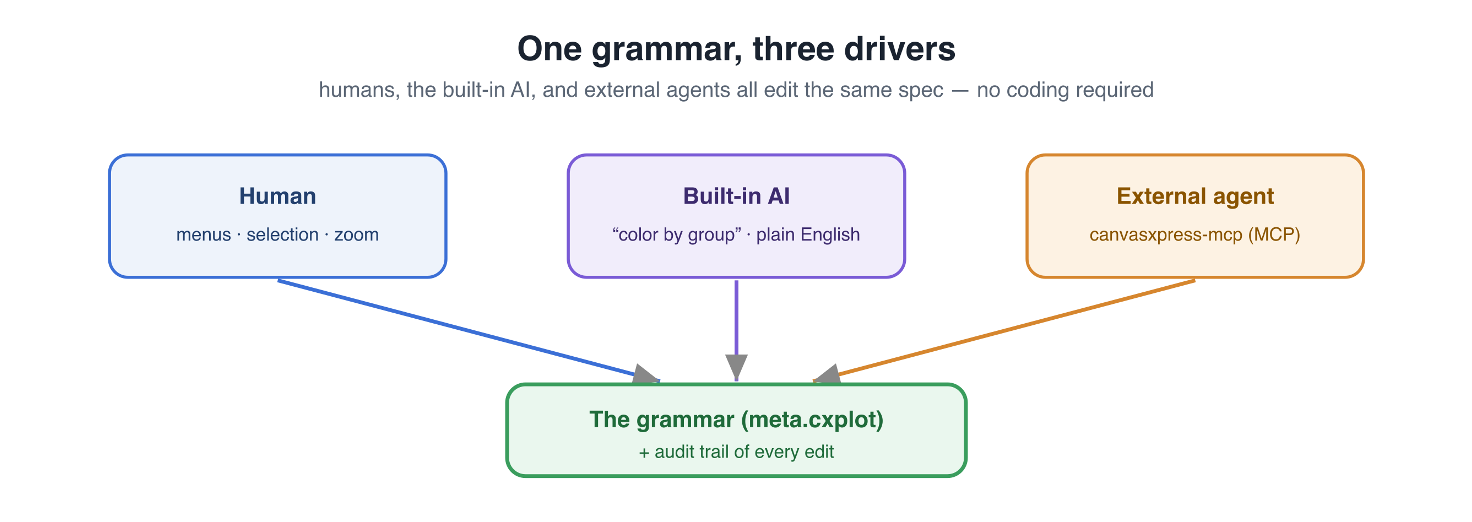
One grammar, three drivers — humans, the built-in AI, and external agents edit the same spec.
Introduction
Because every CanvasXpress figure is described by a single normalized spec (meta.cxplot), it can be built and edited by an AI agent exactly as a person would — no coding required. canvasxpress-mcp exposes the full chart grammar over the Model Context Protocol (MCP), the open standard for connecting AI assistants to tools, so agents such as Claude can create and refine reproducible charts.
What is canvasxpress-mcp
canvasxpress-mcp turns a plain-English description into a ready-to-use CanvasXpress JSON configuration — the object you pass straight to new CanvasXpress(). No CanvasXpress expertise required. Ask for "a clustered heatmap with RdBu colors and dendrograms on both axes" or "a volcano plot with log2 fold change on x and -log10 p-value on y" and get back a validated config.
It is accurate by construction: your request is matched against curated few-shot examples with semantic vector search (RAG), only the relevant slice of the CanvasXpress knowledge base is assembled into the prompt, hallucinated parameter names are stripped against the known schema, and every column reference is validated against your data. It runs against several LLM backends — Anthropic, Amazon Bedrock, local Ollama, and OpenAI-compatible gateways.
One Grammar, Three Drivers
Three kinds of driver all edit the one spec, and every change flows through the same audit trail:
- Human — menus, selection, zoom, and the interactive UI.
- Built-in AI — the on-page copilot; describe a chart in plain English and it writes the spec.
- External agent — Claude and other assistants driving canvasxpress-mcp over the Model Context Protocol.
The single shared target — meta.cxplot plus an audit trail of every edit — is what makes this possible.
Agent Tools
The server exposes a full set of tools an agent (or the CanvasXpress UI) can call. Authoring a figure:
- generate — a new config from a plain-English description (optionally with your headers and column types).
- modify — change an existing config from an instruction, e.g. "change colorScheme to Spectral and add a title".
- select — recommend a chart type from your intent and column types.
- km — build a Kaplan–Meier survival config, detecting time/status/group columns.
- map — choropleth and pie-map configurations.
- upload — load a CSV/TSV/JSON data file and get back a CanvasXpress data object ready to chart.
Validating and rendering: every tool returns a validated config, and two tools close the loop so an agent can check its own work:
- validate — lint a figure against the published JSON Schema and the parameter registry, reporting unknown keys, bad types and invalid column references.
- render — render a figure server-side to a PNG (base64) using the real engine, so an agent can see what it produced.
Discovery & explanation:
- list-chart-types — every supported graph type with its description and category.
- params / axes / minimal-params / explain — query the parameter schema, axis-assignment rules, minimal required parameters, and explanations of any config property (including R and ggplot2 bridges).
Dashboards: the same server composes multi-panel, coordinated dashboards:
- suggest / compose — propose a dashboard layout from your data and intent, then build the full coordinated spec.
- validate-spec / result — validate a dashboard spec and retrieve a composed dashboard's result.
- publish — publish a dashboard so it can be opened as a live, shareable app.
Because every tool returns a validated CanvasXpress config, agent output composes cleanly with human and built-in-AI edits — and each config is a portable, reproducible figure.
Auditable by Construction
Agent actions flow through the same reproducible audit trail as every other interaction. Each manipulation is a grammar operation (sort→arrange, hide→filter, recolor→mapping, log→mutate), so the figure always records how it was made, can be replayed from raw data, and can be undone or shared as a recipe — whether the edits came from a person, the built-in AI, or an external agent.
Get Started
canvasxpress-mcp is open source at github.com/neuhausi/canvasxpress-mcp. Clone it, create a virtual environment, install the requirements, configure an LLM provider, and start the server:
git clone https://github.com/neuhausi/canvasxpress-mcp.git
cd canvasxpress-mcp
python3 -m venv .venv && source .venv/bin/activate
pip install -r requirements.txt
python build_index.py                 # build the vector index (one-time)
export ANTHROPIC_API_KEY="sk-ant-..." # or Bedrock / Ollama / OpenAI-compatible
python src/server.py                  # serves http://localhost:8100 (MCP at /mcp)
The server speaks the Model Context Protocol at /mcp, and also exposes REST/JSONP endpoints (/generate, /modify, /km, …). The same server powers the built-in AI copilot on this site: CanvasXpress routes natural-language requests to it through the llmServiceURL setting, so a chart can call askLLM() directly.
The knowledge base that grounds the model lives at github.com/neuhausi/canvasxpress-LLM. See the repository README for LLM-provider options and production deployment.
